Fake crypto-wallet downloads used to deploy ScreenConnect remote access
Files named after Ledger, Coldcard, Pera and Revolut quietly install ScreenConnect and hand strangers control of your computer. What researcher bartblaze found, what is at risk if you use a hardware wallet, and what to check today.


Would you run a command file you had just downloaded as an update for your wallet?
Downloaded one of these files?
If you only downloaded the ZIP, do not run the.batfile inside it.
If you ran it, disconnect the PC from the network and follow the recovery steps further down.
Malware researcher Bart, known as "bartblaze", contacted us about the analysis he published on Blaze's Security Blog on 17 November 2026. What caught our eye were two files with different names and identical contents. One looked like it was about a wallet. The other, about a tax return.
Same file, different story
For Coldcard, v1.5.3Q-q1-coldcard.zip from coldcard[.]pro looks, by its name, like a specific firmware version for the device. For Ledger, Ledger-wallet-Transition-Transcript.zip appeared on ledger-wallet[.]net and ledgeradvisorinfo[.]app. For Pera Algorand Wallet, Pera_Algorand_Wallet_v2.1.2.35.zip came from peraalgowallet[.]app. All three ZIPs contained a Windows command file (.bat).
Next to them are two names that point to tax files: revolut-taxfile.zip, with Revolut-taxfile.bat, and xamantaxfile.zip, which points to Xaman, an XRP wallet. The BAT named after Revolut and the one named after Pera have the same SHA-256, the same digital fingerprint. In other words, the label changed, not the command file.
Picture a folder on your desk labelled "for the tax return". You pull it from the pile because the label fits the job in front of you, not because you checked who left it there. That is how we read the logic of the lure. The Pera user recognises their wallet and sees a plausible version number. Someone looking for tax documents sees a file that promises to save them some digging. Two different reasons for the same click.
The support you never called
The turning point is running the BAT. The file runs commands and starts the next stages. Along the way PowerShell, a built-in Windows tool, is used to start processes and run commands in a hidden window, bypassing the execution policy. Then ScreenConnect is installed from an .msi or .exe file.
ScreenConnect is legitimate remote-support software by ConnectWise. In this chain it shows up as a Windows service named ScreenConnect Client, in the folder C:\Program Files (x86)\ScreenConnect Client (abb21f5ccc9bd236)\. It connects to fjksdjfdtitive[.]net, IP 191.96.101[.]224, on TCP port 8041, as a "Guest"/"Access" session.
When you call a technician yourself, you give them access so they can operate the PC and fix a problem. Here the same capability works for the other side: the attacker can control the computer remotely, run commands and take whatever information they find there. That is why recognising the program's name in your app list is not enough. The question is whether the access was installed with your approval, and who is using it.
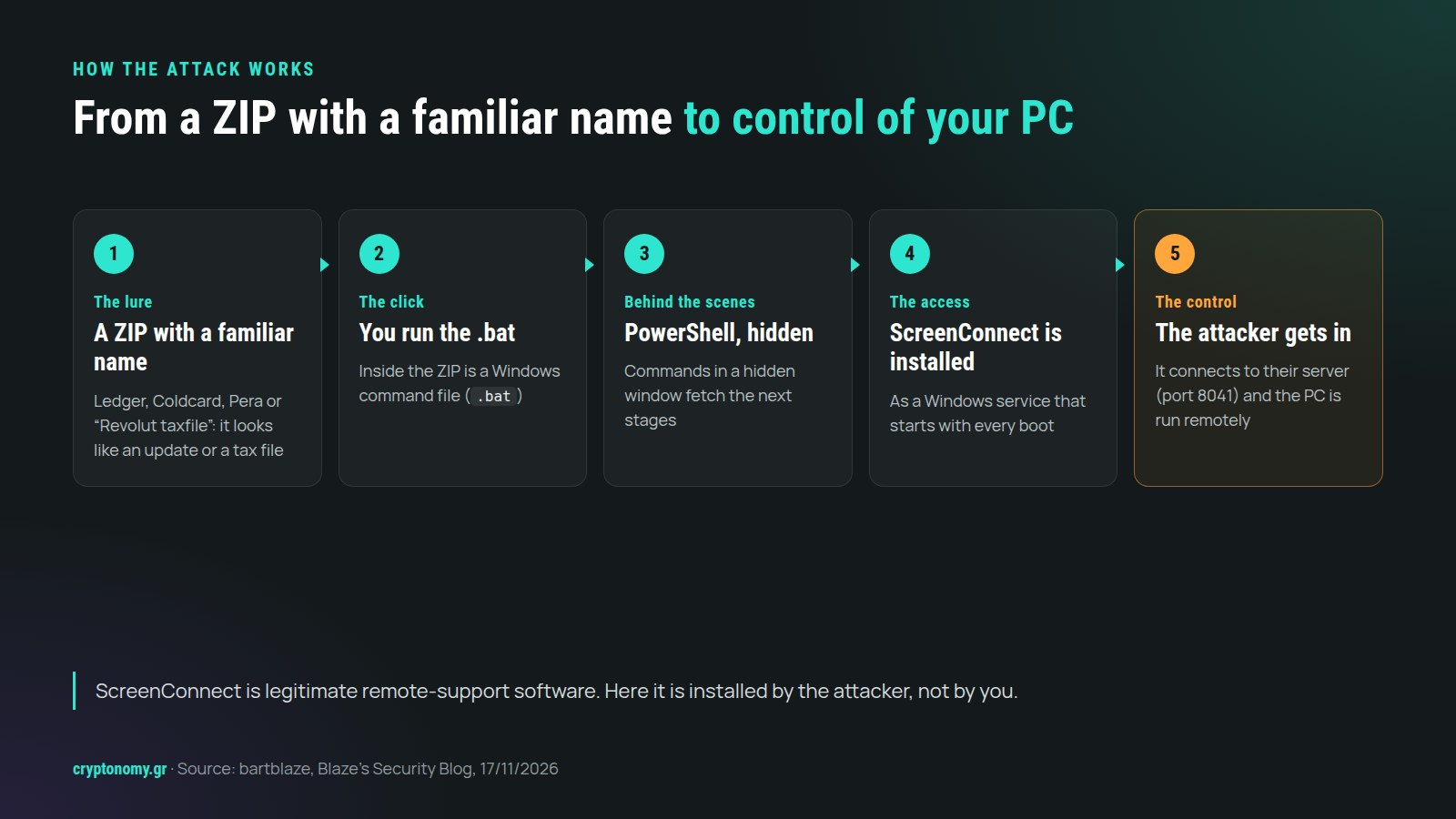
From the click to remote control: the five steps of the attack.
What changes if you have a hardware wallet
Why lure the owner of a hardware wallet if their private key sits on a separate device? Our reading is that the computer is valuable in itself. It may hold saved passwords, open sessions on email or exchanges, even a digital copy of the seed phrase if the user has stored one there.
If the key stays on the hardware wallet, control of the PC does not by itself allow signing without confirmation on the device. But who approves a transaction is one thing, and which address they approve is another. If the PC shows you a different address from the one you meant to use, pressing the button does not fix the mistake. That is how we read Bart's advice: check the address on the hardware wallet's own screen before you confirm.
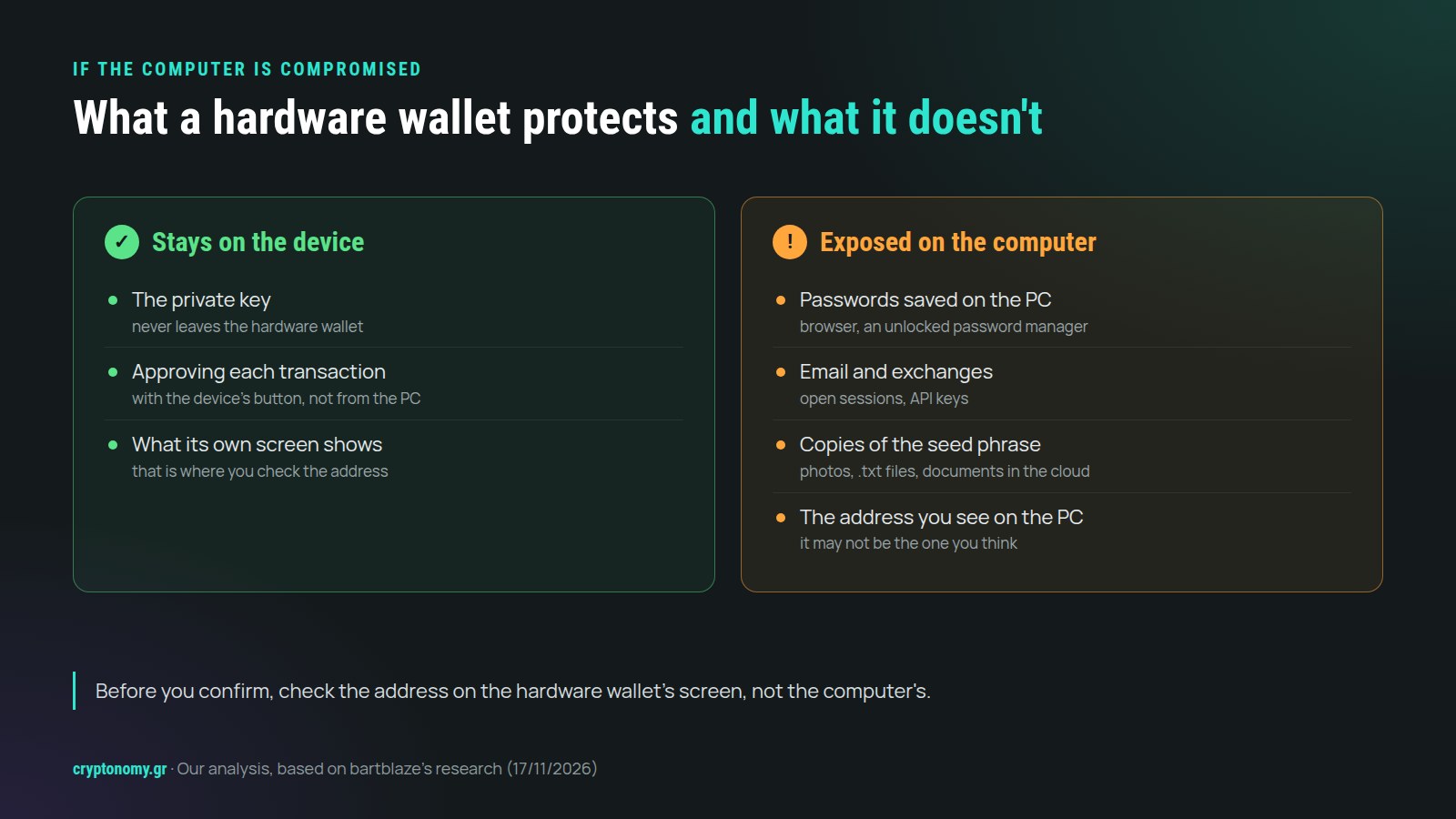
The device guards the key. Whatever is on the computer is exposed.
What we don't know yet
We don't know how the files reached users, who was behind the campaign, which countries were targeted, how many victims there were, whether data was taken or whether there were losses. No domain is given for Revolut and Xaman, and no BAT is listed for Xaman. The analysis describes access to the computer, not a breach of the hardware wallet device itself, and does not show that stealing recovery phrases was the campaign's goal.
Why the tax lure matters in Greece
This is our own assessment, not Greek targeting found by the researcher. Revolut is widely used in Greece and, after the recent announcement of a new tax on crypto, many people are looking up how to declare it. If you are already reading about crypto tax, a ZIP with "Revolut" and "taxfile" in its name can look like the very file you were missing. That, in our view, is what makes the lure convincing: it doesn't need to create a new need. It only has to fit the one you already have.
Recovery, step by step
We keep the source's order. The account changes in step four happen in parallel, from a clean device.
- Isolate the PC. Disconnect it from Wi-Fi and Ethernet. Do not use wallets, banking or email from it.
- Block the connection on the network. Block fjksdjfdtitive[.]net and IP 191.96.101[.]224 at network level. This mainly concerns people who manage a company network or a router with filtering. If you cannot block it, keep the PC disconnected and move on to the checks.
- Look for these specific traces. In installed programs, look for
ScreenConnect Client (abb21f5ccc9bd236). Inservices.msc, look for theScreenConnect Clientservice. If you find it, stop and disable it before deleting it. In%TEMP%, look for.batfiles or folders starting withsc_installer_. If you find the traces, the advice is to reinstall Windows. If not, run a full antivirus scan and use a second tool as well, such as Malwarebytes. - From a clean device, secure your accounts in parallel. Change the passwords of your email, password manager and exchanges. Revoke sessions and API keys and review token approvals.
- Stop using wallets on that PC. If the recovery phrase or private key may have been exposed, treat the wallet as compromised. Create a new wallet with a new recovery phrase on a clean device and move your funds. Verify addresses on the hardware wallet's screen, revoke suspicious approvals, turn on multi-factor authentication (MFA or 2FA) on exchanges and contact your exchange. Never give your recovery phrase to anyone presenting themselves as support.
Our view
For wallet updates, start from the official app or type the known official address yourself. If a ZIP presented as an update or a tax document asks you to run a .bat, stop there. The familiar name is part of the lure, as in every phishing attack.
If you find ScreenConnect you don't recognise, check who installed it and whether they were authorised. And if someone from "support" asks for your recovery phrase, end the conversation. For more practical guides, see our security and scams section. If you are comparing devices, see the hardware wallet comparison, keeping in mind the limit this case shows: the device protects the key, not your computer.
Source: Bart ("bartblaze"), "Fake crypto-wallet downloads used to deploy ScreenConnect remote access software", Blaze's Security Blog, 17 November 2026. The full indicators of compromise (IOCs) are in the post and on AlienVault OTX.